1. Home
  2. Features
  3. Structured AI fields

Structured AI fields

Structured AI fields: intent, objections, next step

From each recorded conversation, the after-call AI fills a fixed set of structured fields: lead intent, timeframe, price band, geography, language, objections, next step, and flags for hot lead, Spanish-speaking agent needed, do-not-call signal and wrong person. The set is the same for every workspace and the prompt is tuned for real estate calls; it is not configurable per industry. There is no numeric score. The fields tell you what to review, never whether a sale will close.

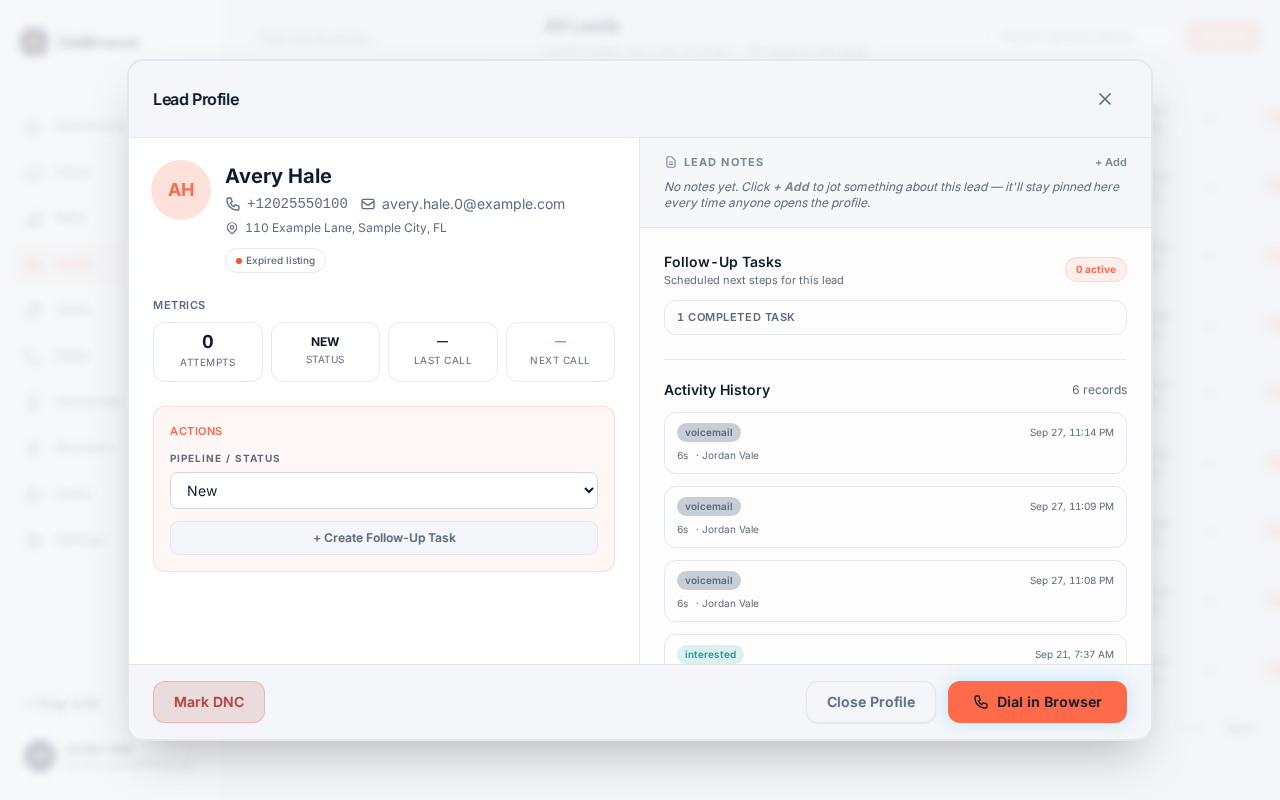
Lead detail view with the AI intent badge, the structured fields and the call summary
Real product interface. Sample data, fictional people and numbers.

How it works.

4 steps, in the order they happen during a session.

  1. 1

    Fields, not a paragraph

    The model reads the transcript of the recording and returns discrete fields: intent, timeframe, price band, geography, language, objections, next step and flags. Scanning fields beats reading ten paragraphs.

  2. 2

    Flags surface the edge cases

    Flags cover hot lead, wrong person, do-not-call signal and Spanish-speaking agent needed. A do-not-call signal is a prompt to check the record; the operator's disposition remains what actually governs.

  3. 3

    Other details stay in the summary

    Criteria, financing and anything else the caller mentions can appear in the summary text. They are not dedicated fields, and you cannot add custom fields.

  4. 4

    Keep the source close

    A field is the model's reading of a conversation, not a fact checked elsewhere. Where a value decides a consequential action, open the transcript or the recording first.

The specifics.

What the product does today. Plans from $25 per seat; three lines, voicemail drop and AI start at Pro, $49.

Lead detail view with the AI intent badge, the structured fields and the call summary
Real product interface, sample data.
Intent field
Buyer, seller, both, renter, investor, unknown or unclear.
Timeframe
Now, 1 to 3 months, 3 to 6, 6 to 12, over 12, or unknown.
Objections
Short phrases for the objections the caller stated.
Next step
The agreed follow-up, such as a callback time, in one sentence.
Signal flags
Hot, wrong person, do-not-call signal, Spanish-speaking agent needed.
Fixed set
Same fields for every workspace. No custom or per-industry fields, no numeric score.
After the call
Structured fields are filled from the recording afterward, never live on the line.

What the fields are, and what they are not

The structured fields are a fixed set the model fills from the recorded conversation: lead intent, timeframe, price band, geography, language, objections, next step, and flags for hot lead, Spanish-speaking agent needed, do-not-call signal and wrong person. On a real production call, this looked like intent buyer, geography southwest with an area from Naples to Tampa, no stated price band or timeframe, two objections quoted from the conversation, and a next step of a 5PM callback the same day. The buyer's criteria (water access, three beds, two baths) landed in the summary text, not in a dedicated field.

What the fields are not: a probability of closing, a grade of operator quality, or consent evidence. The hot flag is a signal to review, not a grade. Use the fields to decide what deserves your ears and your follow-up time.

A field can disagree with the operator's note or the summary. Resolve the difference against the recording rather than picking the convenient version, and keep examples of repeated inconsistencies for support to investigate.
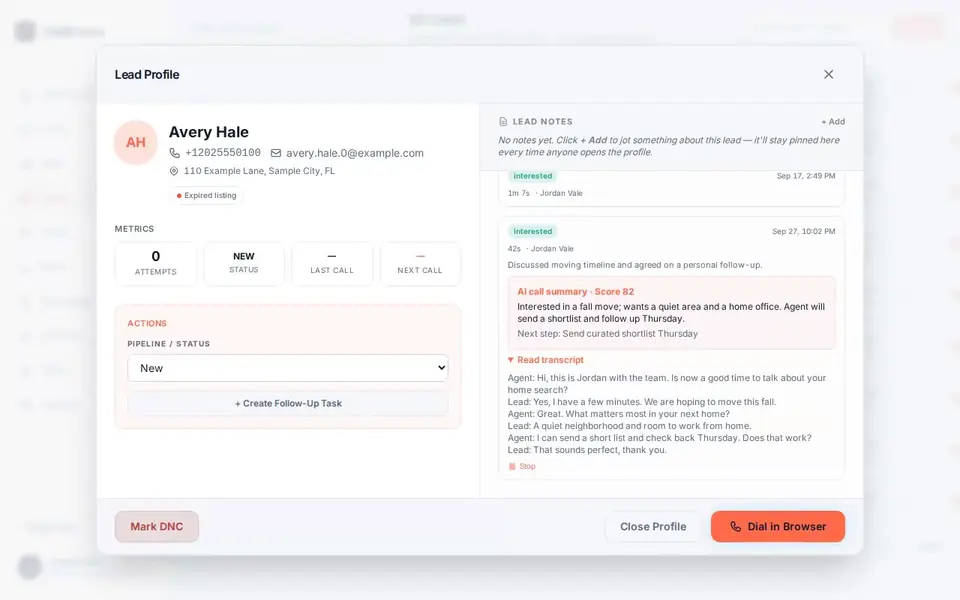
Turning fields into reviews

The fields earn their keep at scale. A manager picking calls to review can look for hot flags, wrong-person calls or do-not-call signals instead of opening every recording. A covering teammate inherits a lead with the next step already written instead of a stack of unexplained audio.

Write your review questions before you open anything. Did the operator state the purpose. Was the next step actually agreed. Does the summary preserve a refusal rather than converting it into interest. The fields tell you where to look; the audio tells you what happened.

Where a field seems wrong, record the call reference and describe the discrepancy rather than overwriting it silently. Repeated examples help investigate model behavior. Structured fields are included on Pro and Team, with no per-call charge.

Questions about structured ai fields.

Straight answers. Anything else: email support.

Is there a lead score?
No. There is no numeric score. The hot flag is a yes or no signal about the conversation as the model read it. It does not predict a sale, establish permission or measure the operator. Use it to choose which calls to review. What actually happened lives in the recording, the transcript and the operator's note, and that is where consequential decisions get checked.
Which fields does it fill?
A fixed set: lead intent, timeframe, price band, geography, language, objections, next step, and flags for hot lead, Spanish-speaking agent needed, do-not-call signal and wrong person. Details such as criteria, financing or budget may appear in the summary text; they are not dedicated fields. The set is not configurable per workspace or industry. The real-call example published on this site lists the actual values from one production call.
Can structured fields be filled while the call is live?
No. The AI layer works on the recording after the call ends. Nothing it produces reaches the lead, and nothing it computes decides who gets dialed next. The queue follows the list, filters and caps you configured. After-call is a deliberate design choice, so the conversation stays between two humans.
What if a field contradicts the operator's note?
Resolve it against the source. Open the transcript for the wording and the recording for the tone and timing. The operator was on the call; the model read a transcript of it. Either can be wrong, so the audio settles it. Where you see repeated inconsistencies, keep the call references and send them to support rather than working around them quietly.
Which plans include structured AI fields?
Pro at $49 a month and Team at $79 a month for two dialing seats (plus $20 per added dialer) include transcripts, fixed structured fields and summaries. Starter at $25 does not include AI. There is no per-call AI charge.

Try it on a real session.

Setup is assisted. A person on our team creates your workspace, admin login and dialing seats after you choose a plan or send a setup request; there is no instant self-serve signup. Calls run on your own Telnyx account (bring your own), which Telnyx bills separately, and need an eligible calling list. The request form takes no payment and does not create an account.

Request setupPricing